Pular para o conteúdo
BASE DE CONHECIMENTO BASE DE CONHECIMENTO

BASE DE CONHECIMENTO

BASE DE CONHECIMENTO BASE DE CONHECIMENTO

BASE DE CONHECIMENTO

  • Página inicial
  • Página inicial
  • 2025
  • abril
  • 8
  • GERAL | COMO BAIXAR O ANYDESK
GERAL INFORMATIVO WIKI acesso remoto, any desk, anydesk, suporte Suporte Prontosoft

COMO BAIXAR O ANYDESK

Acesse o site do AnyDesk
Clique no botão ‘BAIXE AGORA‘
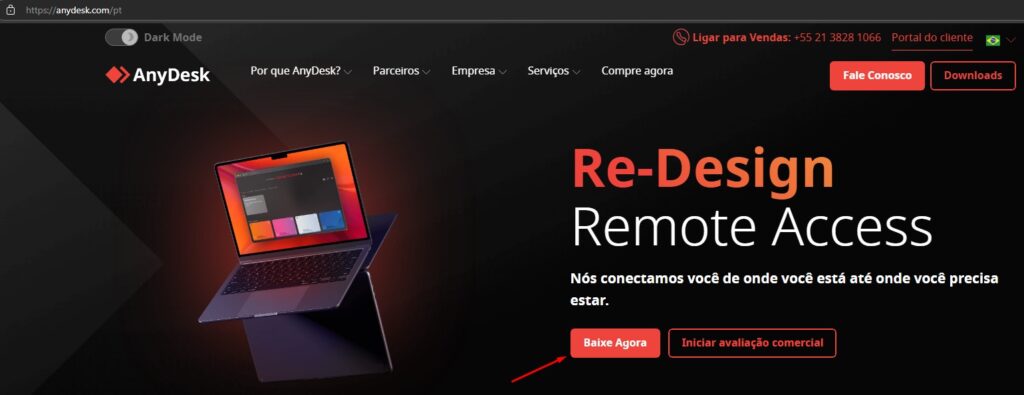
  • Para acessar o site: CLIQUE AQUI

Nos Downloads (arquivos baixados)
Clique em ‘ABRIR ARQUIVO’
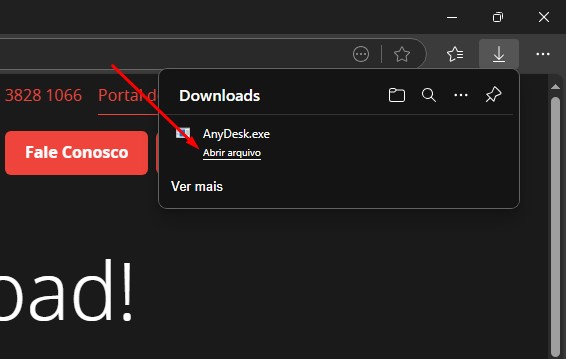

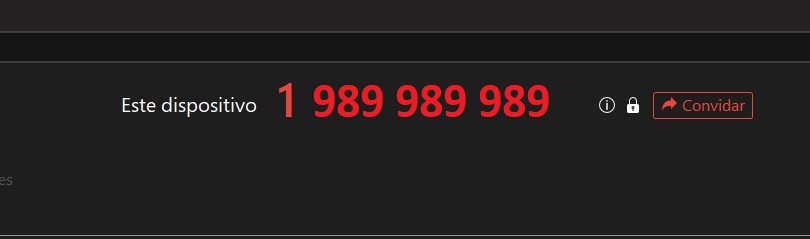
Informe ao Suporte o Código
Este Dispositivo
  • Não precisa criar uma conta
  • Deixe o AnyDesk aberto no computador durante o atendimento


Tag acesso remoto any desk anydesk suporte
Previous post

ESTOQUE | COMO TRANSFERIR PRODUTOS ENTRE CONTAS

Next post

NOTA NF-e | REENVIO DE CUPOM FISCAL NFC-e EM MASSA

Related Posts

Prontosoft Suporte 2 0

A PAGAR | CADASTRAR CONTAS A PAGAR

11/06/2026
Suporte 4 Prontosoft 0

NOTA NFe | SALVAR EM PDF

10/04/2026
Prontosoft Suporte 3 0

ESTOQUE | DUPLICAR ITEM

06/04/2026

PRONTOSOFT | Powered By SpiceThemes